| Filename | Latest commit message | Latest commit date |
|---|---|---|
| .gitignore | ||
| README.md | ||

Instant Replay Guard



Public releases and issue tracking for Instant Replay Guard.
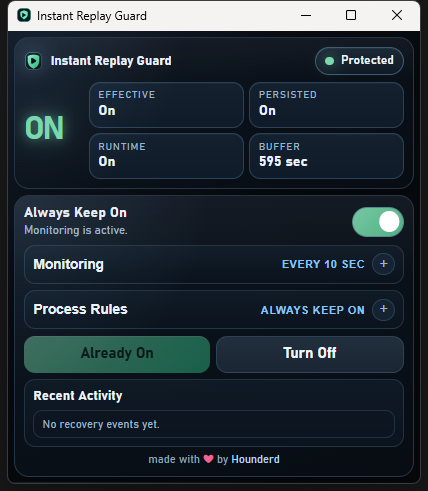
Instant Replay Guard is a lightweight Windows tray app that keeps NVIDIA Instant Replay from silently turning itself off, so you stop losing clips after restarts, overlay resets, or NVIDIA hiccups.

Quick Links
- Website: https://guard.nodd.dev
- GitHub Releases: https://github.com/Hounderd/InstantReplayGuard/releases
- VirusTotal scan: https://www.virustotal.com/gui/file/f972703e20b38de01f4fc8a0143e357f3ef43774d95e945b7a53ff16c4eda9d5
- Tip jar: https://ko-fi.com/hounderd
What Instant Replay Guard does
- keeps Instant Replay alive in the background
- re-enables it if NVIDIA silently drops it
- includes built-in capture controls for replay saving and manual recording
- runs locally on your machine with no account or cloud sync
- stays outside the game process entirely
- sits in the tray and uses negligible CPU when idle
- supports process-aware keepalive modes for app-specific behavior
- includes pause and exclusive app rules for whitelist-style control
- can perform one startup IR reset when NVIDIA's mic state still looks uninitialized after boot
- can detect when NVIDIA capture is blocked by low disk space or a full capture drive
Hotkey requirement
Instant Replay Guard uses NVIDIA's currently configured Instant Replay toggle shortcut.
- it does not require the default NVIDIA keybind
- the
DVRTogglehotkey does need to exist in NVIDIA settings - the
DVRSavehotkey does need to exist if you want replay saving to work - the
RecordTogglehotkey does need to exist if you want recording control to work - if those shortcuts are unbound or invalid, Guard cannot perform the related action
Process Rules
Some apps prevent Instant Replay from being active, which conflicts with a tool that is trying to keep it on. Instant Replay Guard includes process rules so you can control when protection should pause or only run for specific apps.
Open the app and expand Process Rules. Add one executable name per line.
Examples:
obs64.exechrome.exenetflix.exeeldenring.exe
Instant Replay Guard currently matches against the running process executable name, not the full command line.
Available modes:
-
Always Keep On
Guard keeps Instant Replay on at all times. -
Pause While Listed Apps Run
If any listed app is running, Guard pauses itself and will not re-enable Instant Replay. -
Only Keep On For Listed Apps
Guard only keeps Instant Replay on while at least one listed app is running. If none of the listed apps are active, Guard will let Instant Replay stay off.
Typical use cases:
- Add
netflix.exeor browser processes if DRM/video apps conflict with Instant Replay. - Add specific games if you only want Guard active while those games are running.
- Add capture/streaming tools if you want Guard to avoid fighting with them.
Startup Mic Recovery
Some systems need a manual Instant Replay off/on after reboot before NVIDIA finishes initializing microphone-related state correctly.
Instant Replay Guard now includes an optional Startup Mic Recovery setting under Monitoring.
When enabled:
- Guard waits for startup
- checks NVIDIA's current Instant Replay + microphone state
- if Instant Replay is on but mic state still looks uninitialized, it performs one controlled IR off/on reset
- logs the result in Recent Activity
This is a recovery feature, not full microphone control. Guard can currently detect NVIDIA microphone state, but it does not directly set the NVIDIA mic device or mic mode yet.
Capture Controls
Instant Replay Guard includes built-in actions for:
- Save Replay
- Start Recording
- Stop Recording
These are available from both the tray menu and the desktop app UI.
They use NVIDIA's currently configured capture shortcuts, so the related bindings must exist in NVIDIA settings:
DVRSaveRecordToggleDVRToggle
Storage Diagnosis
If NVIDIA turns Instant Replay off because the capture drive is full or storage looks unavailable, Instant Replay Guard now tries to detect that instead of blindly re-enabling Instant Replay over and over.
When Guard sees a likely storage blocker:
- it records the reason in Recent Activity
- it avoids pointless recovery attempts while storage is still the problem
This helps distinguish normal NVIDIA hiccups from cases where the capture drive actually needs attention.
Safety
- no account
- no telemetry
- no cloud sync
- no game memory interaction
Support
If you hit a bug or edge case, open an issue and include:
- your Windows version
- NVIDIA app version
- whether Instant Replay was on or off at the time
- what action caused it to fail
Source code
This repository does not contain the application source code. Public builds are distributed as release assets only.